Showing posts with label System Tuning. Show all posts

Thursday, 8 August 2013

Avira System Speedup 1.2.1.8300

Avira System Speedup boldly goes where no user can, safely and thoroughly removing unused programs and files, optimizing Windows to bring back the fast, error-free performance you deserve!
Unleash the power you didn't know your PC had. Has your computer slowed down over time? Give it maintenance, not patience! Your PC's best days are still yet to come. Clean it up. Tune it up. Free your PC to perform at its best! Throughout its life, your PC accumulates programs, logs, junk files, cookies and other scraps that stick around long after they are needed. All they really do is weigh down your memory and processor.

Features

Lightens your computer's load
The System Cleanup module includes a complete set of tools that swiftly and safely clear out PC clutter. Recover significant amounts of wasted space with a Junk Files Cleaner, Registry Cleaner and Smart Defragmenter. Activate the Privacy Cleaner to clear out the data downloaded in your everyday web browsing.
Goes to the source of slowness, freezes and crashes
All PCs must run a number of processes behind the scenes. As new applications are added, background activity can grow chaotic, resulting in errors and hanging. The System Optimizer, complete with a Process Manager and Service Manager, puts wayward PC processes back on track. The Startup Manager speeds up boot time by limiting the number of tasks performed while Windows loads.
Leaves no souvenirs of the past
It's your PC—you should have the final word as to which files can be accessed by others. File Encryption keeps current files on lockdown against prying eyes, while the File Shredder and Disk Wiper ensure that deleted items cannot be recovered. The Uninstaller allows no remnants of removed applications to waste space on your machine or cause errors in the future.
Thoroughly inspects your PC's health
No appointment is necessary to have the Disk Doctor find, diagnose and repair hard disk errors. The Disk Analyzer checks for opportunities to improve disk space usage. For preventive care, the Drivers monitor keeps track of the software that links your operating system to your hardware, reducing the risk of hardware failure.

Screen Shots


System Requirements

OS: Windows Xp, Vista, 7, 8
System: Pentium III Processor 300 MHz or higher
Memory: 256 MB RAM
File Size: 20 MB

Installation Guide

  1. Install program.
  2. Run " Regme" and merge it to System Registry.
  3. Done, Enjoy.

Thursday, 25 July 2013

PC Cleaner Pro 2013 v11.6.13.7.15 Free Download

We believe computers are meant to speed things up, not slow things down, so you can work smarter and faster. That's why we engineered PC Cleaner to provide outstanding antivirus and antispyware protection, and PC optimization tools that works quietly and efficiently, without slowing your PC down like other bloated security products.

Registry Cleaner
PC Cleaner will remove unused and old entries, including File Extensions, ActiveX Controls, ClassIDs, ProgIDs, Uninstallers, Shared DLLs, Fonts, Help Files, Application Paths, Icons, Invalid Shortcuts and more.
Increase Your PCs Performance
PC optimization is the quickest way to adjust your system settings at once. PC Cleaner will analyze your system & adjust your PC to function at its maximum potential performance.
Boost Your PCs Speed
PC Cleaner will tweak your complete system to help boost your PC speed and overall system performance. You could have faster downloads, uploads, web surfing and more.
Certified Virus + Spyware Protection
Certified Antivirus Pro will scan your complete system for malicious threats including: viruses, spyware,. rogue programs, trojans, adware, rootkit, dialers, worms, parasites and other potentially harmful programs that may be installed on your computer.
Security Defense
PC Cleaner will scan and check for windows vulnerablities within Windows system. Windows Update is a service provided by Microsoft. Security updates or critical updates protect against vulnerabilities to malware and security exploits.
Clean Your System
In using a computer from day to day youre going to accumulate system clutter. You can significantly increase your PC performance & stability by removing these files.
Privacy Protection
PC Cleaner is designed to protect you by cleaning up all the unwanted history data on your computer which could also put you at risk of identity theft.
Internet Optimizer
PC Cleaner will automatically adjust your internet connections to increase super fast web surfing, faster downloads including: music , movies games and video downloads.
System Optimizer
PC System Optimizer is the fastest way to adjust all your system settings at once. The PC Optimizer works by determining what type of PC you have and what programs you have installed. Then it will adjust system settings so that your machine will function at its maximum capacity.
Memory Optimizer
PC Cleaner will optimize your memory and recover wasted memory (RAM), space and improve system performance.
Startup Manager
Startup Manger allows you control of what programs are launched when you start your computer. You can disable unnecessary programs that are slowing you down.
Uninstall Manager
This feature lets you easily uninstall applications that you don't want you your computer.
BHO Manager
Stabilize your browser and speed up web efficiency by managing Browser Helper Objects and Plugins.
ActiveX Manager
Many ActiveX controls are actually beneficial, but malicious programs frequently use ActiveX controls in order to embed themselves on your system through browser security exploits or compromised security settings. PC Cleaners definition database contains a comprehensive list of malicious ActiveX objects, which will be automatically loaded to the blocked list. This file is updated continuously by our definitions team.
Duplicate File Remover
PC Cleaner Duplicate File Remover will easily find and remove duplicates and help you reclaim valuable disk space and improve data efficiency. Duplicate files are in most cases redundant and unnecessary, so keeping them is merely a waste of hard disk space.

Screen Shots


Installation Guide
1. Extract with WinRAR
2. Run Application
3. Use serial for activate
4. Enjoy...

PC Cleaner Pro 2013 v11.6.13.7.15

PC Cleaner Pro 2013 v11.6.13.7.15 (Portable)

PC Cleaner Pro 2013 v10.11 Free Download

We believe computers are meant to speed things up, not slow things down, so you can work smarter and faster. That's why we engineered PC Cleaner to provide outstanding antivirus and antispyware protection, and PC optimization tools that works quietly and efficiently, without slowing your PC down like other bloated security products.

PC Cleaner Pro 2013 Features

Registry Cleaner
PC Cleaner will remove unused and old entries, including File Extensions, ActiveX Controls, ClassIDs, ProgIDs, Uninstallers, Shared DLLs, Fonts, Help Files, Application Paths, Icons, Invalid Shortcuts and more.
Increase Your PCs Performance
PC optimization is the quickest way to adjust your system settings at once. PC Cleaner will analyze your system & adjust your PC to function at its maximum potential performance.
Boost Your PCs Speed
PC Cleaner will tweak your complete system to help boost your PC speed and overall system performance. You could have faster downloads, uploads, web surfing and more.
Certified Virus + Spyware Protection
Certified Antivirus Pro will scan your complete system for malicious threats including: viruses, spyware,. rogue programs, trojans, adware, rootkit, dialers, worms, parasites and other potentially harmful programs that may be installed on your computer.
Security Defense
PC Cleaner will scan and check for windows vulnerablities within Windows system. Windows Update is a service provided by Microsoft. Security updates or critical updates protect against vulnerabilities to malware and security exploits.
Clean Your System
In using a computer from day to day youre going to accumulate system clutter. You can significantly increase your PC performance & stability by removing these files.
Privacy Protection
PC Cleaner is designed to protect you by cleaning up all the unwanted history data on your computer which could also put you at risk of identity theft.
Internet Optimizer
PC Cleaner will automatically adjust your internet connections to increase super fast web surfing, faster downloads including: music , movies games and video downloads.
System Optimizer
PC System Optimizer is the fastest way to adjust all your system settings at once. The PC Optimizer works by determining what type of PC you have and what programs you have installed. Then it will adjust system settings so that your machine will function at its maximum capacity.
Memory Optimizer
PC Cleaner will optimize your memory and recover wasted memory (RAM), space and improve system performance.
Startup Manager
Startup Manger allows you control of what programs are launched when you start your computer. You can disable unnecessary programs that are slowing you down.
Uninstall Manager
This feature lets you easily uninstall applications that you don't want you your computer.
BHO Manager
Stabilize your browser and speed up web efficiency by managing Browser Helper Objects and Plugins.
ActiveX Manager
Many ActiveX controls are actually beneficial, but malicious programs frequently use ActiveX controls in order to embed themselves on your system through browser security exploits or compromised security settings. PC Cleaners definition database contains a comprehensive list of malicious ActiveX objects, which will be automatically loaded to the blocked list. This file is updated continuously by our definitions team.
Duplicate File Remover
PC Cleaner Duplicate File Remover will easily find and remove duplicates and help you reclaim valuable disk space and improve data efficiency. Duplicate files are in most cases redundant and unnecessary, so keeping them is merely a waste of hard disk space.

Screen Shots


Installation Guide

1. Extract with WinRAR
2. Run Application
3. Use serial for activate
4. Enjoy...


Download Now

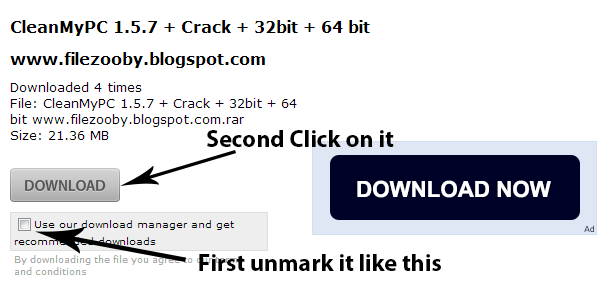
How to Download this Software

Wednesday, 17 July 2013

Advanced Registry Doctor Pro Premium 9.4.08.10 Free Download

Advanced Registry Doctor Pro Premium is capable of scanning for, diagnosing and curing multiple registry problems, which averts possible malfunctions and crashes, and significantly improves the speed of computer loading and performance. In addition, the program comes with a set of advanced options, like registry defragmenting, built-in scheduler, backup and restore feature, history log and many other perks. The registry is one of the most essential components of Windows OS, critical to proper functioning of any PC computer.Advanced Registry Doctor has several applications designed to contribute to its overall safety. It divides the list of errors into individual categories and offers individual undo functionality as well as a registry backup and system restore function.

Features:

  • Automatic Repair
  • System and Registry Backup
  • Compress or Defrags Registry
  • Quick and Full Registry scan
  • Advanced and Novice modes
  • Individual Undo
  • Scheduling abilities
  • Powerfull customization options

Screen Shots

Screen Shot 1
Screen Shot 3
Screen Shot 2

Installation Guide

  1. Download and Extract with WinRAR
  2. .exe File Format (Setup Full Version)
  3. You now have a much easier installation
  4. Run Application
  5. Click on "Install Now" For Install Software Full Version
  6. Enjoy...

Tuesday, 16 July 2013

Recover4all Pro 2.18 Free Download

Recover4all Professional is easy to use data recovery software that lets you recover (undelete) files that were accidently deleted under Windows. It does not matter, if the files were removed from the recycle bin or were directly deleted. The program is fast and very easy to use. The deleted files can be restored with a few mouse clicks. To prevent deleted files from becoming overwritten, Recover4all does not require installation and can run directly from a USB disk, flash drive Etc… Recover your data with this easy-to-use software.

Installation Guide

1. Download it and extract it with WinRAR
2. Unpack and Install it
3. Enjoy...


Wednesday, 3 July 2013

PC Tools Registry Mechanic v11.1.0.214 Free Download

Powerfully simple tools to clean up your PC and secure your personal privacy.
  • Clean up and optimize your PC
  • Keep Internet and PC activities private
  • Permanently erase sensitive information
  • NEW! Find and remove programs you don’t use
  • NEW! Works on Windows® 8

Powerfully Simply

  • You've heard that cleaning up your PC will help it run smoother, but you don't know where to start. With PC Tools Registry Mechanic, you'll get a fresh, new experience; combining the trusted, powerful tools you need with the simplicity you want.
  • Access the tools you need with a refreshingly intuitive user interface.
  • Get started quickly with 1-click optimization buttons that automatically run performance-enhancing tools for you.
  • See how you can further enhance your PC with new dashboards and user workflows that guide you through what tools to use to keep your computer running at its optimum.

Trusted PC Cleanup

  • For over 13 years, people like you have relied on PC Tools Registry Mechanic to simply tune up their PCs.
  • Speed up your PC, fix errors, clean up conflicts, and enjoy using it again.
  • NEW! Free up even more space and resources by finding and removing the programs you don't use.

Personal Privacy

  • What you do on your PC is nobody else’s business. PC Tools Registry Mechanic helps ensure that your personal computer use stays... well, personal.
  • Keep your Internet activities safe from prying eyes with Internet privacy tools that erase browsing history, search history, cookies, passwords, and chat logs.
  • Even clear your PC activity history and stop people from seeing your temporary and recently opened files.
  • Ensure that what you delete stays deleted with secure digital file shredding and disk bleaching.

PC Tools Registry Mechanic Features

  • Clean and Compact Registry. Speed up your PC by cleaning and repairing errors.
  • Optimize Windows®. Speed up Windows with PC Tools’ preset optimizations.
  • Find and remove programs you don't use. Gain disk space and resources by finding and removing programs you don't use.
  • Clear Cookies and Browser History. Erase Internet activities from your browsers.
  • Clear Browser Passwords and Form Data. Erase saved passwords and form information.
  • Clear Temporary and Deleted Files. Free up hard drive space by clearing unused files.
  • Clear Recent File History. Erase your recently opened files lists.
  • Shred Files. Permanently shred files and folders from your computer.
  • Bleach Disks. Permanently wipe your deleted files, making them unrecoverable.

Screen Shots

Screen Shot 1
Screen Shot 3
Screen Shot 2

System Requirements

OS: Windows 2000, Xp, Vista , 7, 8
System: Pentium 3 Processor 233 Mhz (Processor 300 Mhz Recommended)
Ram: 64 MB (128 MB Recommended)

Installation Guide

1. Install Program.
2. Use given Key during installation to activate application.
3. Block internet access "RegistryMechanic.exe" and "Update.exe" files thru firewall.
4. Done, Enjoy.

Monday, 24 June 2013

Hard Drive Inspector Pro 4.1 Free Download


Hard Drive Inspector is an easy-to-use program that monitors computer disks' health to prevent crashes and expensive hard disk recovery. The value of information stored on an average computer hard drive often exceeds the value of the computer itself. But a hard drive is one of the most unreliable internal computer devices. When it crashes (which happens quite frequently), the stored information will be lost fully or partially. Subsequent hard drive recovery is either not possible at all, or constitutes a very sophisticated and expensive procedure that can be performed only by specialists.

Screen Shots

Screen Shot 1
Screen Shot 3
Screen Shot 2

Installation Guide

1: Unpack rar archive
2: Run the setup
3: Use the given key to activate 
4: Enjoy and Support Developers, Buy It, They Deserved It!


Platform: Windows
File Size: 2.62 MB

Saturday, 22 June 2013

Driver Checker 2.7.5 Premium Pro Free Download


Driver Checker is designed to effectively detect the outdated or broken device drivers and satisfy the application upgrade requirements if you can not find the new versions available from the original manufacturers. Driver Checker can deep scan your hardware devices, detect and update the outdated drivers if available, completely backup them and restore them if necessarily; You can also uninstall the drivers completely on demand. Driver Checker does all of these through the easy-to-use interface and makes your system running more secure, stable and always up-to-date.

Key Features and Benefits of Driver Checker

  • Starightfoward and intuitive interface
  • Better PC performance and improved stability
  • Access to the largest drivers database in the industry
  • Continous updates for the latest manufacturer drivers
  • Submit the unavailable drivers updated in next version
  • Unlimited technical supports with our 24x7 technicians
  • Automatically update and maintain these drivers: Printer Drivers, USB Drivers, Sound/Audio Drivers, Vista Drivers, Bluetooth Drivers, Mouse Drivers, Keyboard Drivers, RAID Drivers, Scanner Drivers, Video Drivers, Modem Drivers, Network Drivers, Linksys Drivers, Webcam Drivers, Graphic Drivers, VGA Drivers & Other Windows Drivers!

Screen Shots

Screen Shot 1
Screen Shot 3
Screen Shot 2

Installation Guide

1. Unpack rar archive
2. Run the setup
3. Use the given key to activate 
4. Enjoy and Support Developers, Buy It, They Deserved It!

System Requirements

OS: Win XP/2000/Vista/Win 7
Language: English

File Size: 5.47 MB
Platform: Windows

Friday, 21 June 2013

CleanMyPC 1.5.7 (32bit + 64bit) Free Download


CleanMyPC: Clean PC from unneeded files, system junk and application leftovers. Easy to use yet full-featured Windows Maintenance and Cleaning solution to clean PC.

Features

Scanning
During a scan CleanMyPC analyzes your hard drive to find files which might be safely removed.

Caches & Logs
While Windows and applications run on your computer they usually store chunks of "prepared? data on the hard drive to expedite load.

Help Files
Most applications (as well as Windows itself) come with help files which contain information about program functionality and workflow. You can safely remove help files for the applications that you already use freely.

Extra Languages
Some applications also come with built-in language translations (for example Spanish, Russian or German). This only influences interface translations - you can still type text in any language within the app.

Trash and Junk
In this section CleanMyPC scans for various files you can?t usually access on your own but still can remove.

Additional Utilities
In addition to cleaning and scanning features CleanMyPC comes with a set of built-in utilities which are aimed to help you keep your computer reliable, fast, clean and working like a new one.

Secure Erase
When you simply remove files to and from Recycle Bin they can still be brought back by third party data recovery software.

Complete Uninstall
Most applications you have on your computer come with a dedicated uninstaller which removes the application you decide to stop using from your system.

Registry Cleanup
The Windows registry is a database that stores configuration settings and options for Windows itself and for all installed applications. Since registry is simultaneously read and written by all the installed applications which can also include malware and spyware programs, it sometimes becomes cluttered or partially corrupted.

Autorun
While launching applications automatically with Windows is convenient some applications might do that without your knowledge and you might want to prevent them from automatically running.

Gadgets & Extensions Manager
Windows (and some applications) install different Gadgets and Extensions onto your system.

Screen Shots

Screen Shot 1
Screen Shot 3
Screen Shot 2

Installation Guide

1. Run the setup 
2. Copy the crack folder content and paste it to the software installed directory.
3. Enjoy and Support Developers, Buy It, They Deserved It!

File Size: 21.3 MB
Platform: Windows

AVG Tuneup 2011 Free Download


Internet optimizer
Internet optimizer automatically tunes your Internet connection settings to speed up your online life.

File recovery
AVG PC Tuneup comes fully equipped with a file recovery tool so that you can recover files that have been damaged or accidentally deleted within Windows.

File shredder and disk wiper
Deleting files or folders removes references to them but doesn’t remove the actual data stored within the file. This means that files you think you've deleted can easily be retrieved.

Track eraser
Lots of information about your activities is recorded on your PC. Track eraser will help you protect your privacy by removing this personal information from your computer.

Disk and registry cleaner
Clean up old files, duplicate files and broken registries to get the most out of your PC.

Disk and windows registry defragmenter
Disc defragmentation optimizes your file system to get the most out of your hard drive. Enjoy a faster hard disk and a more stable and smooth running computer.

Disk doctor and disk explorer
With these two tools it will be easy for you to keep your data organized and safe from being lost due to hard disk failure.

Installation Guide

  • Install the program.
  • Replace the original file(s) with those in crack.
  • Enjoy!

Screen Shots

Screen Shot 1
Screen Shot 3
Screen Shot 2

System Requirements

Minimum System Requirements:
Processor - Intel Pentium 1.5 GHz or faster
Memory  -  64 MB of RAM
Hard disk free space (for installation) 50 MB
Recommended System Requirements:
CPU: Processor Intel Pentium 1.5 GHz or faster
Memory: 128 MB RAM
HDD:  (for installation)  250 MB Hard disk free space

File Size: 7.78 MB
Platform: Windows

TuneUp Utilities 2013 Free Download


TuneUp Utilities 2013 can quickly make your Windows operating system faster, easier to use, and more secure. And all operations performed on the operating system are completely safe, because all changes are monitored by TuneUp Rescue Center and can be undone at any time. All TuneUp Utilities modules can be accessed through a common interface that is divided into six categories. In addition, the main window also has three general buttons in a dark gray bar to the right at the top of the window. Pressing the first button starts the TuneUp Rescue Center module. The second button starts the TuneUp Update Wizard, which can be used to update TuneUp Utilities 2009 to the latest version over the Internet. The last button provides help and settings that you can use to customize the software package to meet your needs.

The new Start page

TuneUp Utilities 2011 welcomes you with a completely redesigned Start page, which tells you about the status of your computer. If problems or nonoptimal settings are found, you are only a mouse-click away from resolving them. The Start page also tells you when new tips for increasing computer performance are available and warns you if maintenance tasks are not being taken care of automatically. The Start page also shows you whether new automatic startup programs have been added to Windows since the last time you ran TuneUp Utilities. You can decide whether these programs that start up automatically are really necessary.

TuneUp Speed Optimizer

Which settings slow your computer down? Which unnecessary services or programs are running in the background? Is your Internet connection optimally configured? TuneUp Speed Optimizer knows the answers to all these questions. It examines your entire system for bottlenecks, superfluous background programs, and incorrect settings. Great: with just one click you can carry out most optimizations very quickly. In addition, TuneUp Speed Optimizer provides suggestions for speeding up your system.

TuneUp Shortcut Cleaner

Cleaning up your working environment is tedious: removing invalid shortcuts from the Start menu, the Desktop, and the Quick Launch bar is very time-consuming. TuneUp ShortCut Cleaner now does the work for you. It checks whether all shortcuts are valid and removes the orphaned ones with just a click of a button. At the same time, empty folders are removed from the Start menu. TuneUp ShortCut Cleaner also checks frequently used programs and cleans up the list of recently opened files.

Support for the Opera browser

After hard disk defragmentation, which we introduced in TuneUp Utilities 2009, the feature most requested by customers was support for the Opera browser. TuneUp Utilities 2010 now also includes full support for Opera. Via several special Opera settings, TuneUp System Control now allows you to change the number of Speed Dial entries, conveniently choose your default search engine, and reenable fast backward and forward navigation. Internet optimization lets you optimize Opera's performance for your Internet connection. Free up disk space lets you delete the Opera cache.

TuneUp Styler

Now you can also change the Vista logo animation which appears just before logon. You can download a whole series of great animations from the TuneUp website. Or, if you prefer, you can choose your own personal image to display while Vista starts up. With Vista, you can also add your own images to Vista's logon screen: With just a few mouse clicks you can create a truly personal logon experience.

TuneUp Uninstall Manager

Redesigned from the ground up, TuneUp Install Manager now runs much faster and has a new, even more intuitive interface so that it is even easier to uninstall unnecessary programs. Unnecessary programs often are forgotten because they were installed a long time ago and then not used. TuneUp Utilities 2009 shows you a list of programs not used for a long time so that you can target for uninstallation those applications that use valuable disk space and in certain circumstances even slow your system down.

TuneUp StartUp Manager

A smooth-running system results when there are no unnecessary autostart applications. The improved TuneUp Startup Manager organizes your programs into groups and provides clear explanations to make it easier for you to identify those programs that are not needed.New automatic startup programs are now highlighted so that you can disable unwanted entries more easily. System start tasks are now also listed in TuneUp StartUp Manager In Vista, in particular, scheduled tasks are used in place of autostart entries.

Free up disk space

The already rapid display of disk space to be freed up is now even faster on NTFS drives. And now it is so easy to delete even more unnecessary files, like the backup files for the first Windows Vista service pack and the Opera and Safari caches. The second "Free up disk space" module that helps you turn off Windows functions that use excessive disk space has also been enhanced. The Windows Search index can now be disabled and deleted with a single click. This makes particular sense if you are already using a different search engine. In addition, TuneUp Disk Space Explorer now runs faster and no longer requires that an entire drive be analyzed. You can now specify that only those folders be analyzed that you are really interested in.

Lots more improvements

Along with the totally new features, there are a series of improvements that are not immediately visible. There are small improvements like Tooltips in the main window, a substantial increase in the number of problems that can be found byTuneUp Registry Cleaner, and better progress feedback from TuneUp Drive Defrag. But there are also big improvements "under the hood". Two good examples are a completely reworked installation program and significant improvements in our update technology.

Screen Shots

Screen Shot 1
Screen Shot 3
Screen Shot 2

Installation Guide

1. Run app (TuneUp Utilities 2013).
2. Use one of the Serial Key.
3. Enjoy with fast computer.

File Size: 25.3 MB
Platform: Windows


TuneUp Utilities 2012 Free Download


TuneUp Utilities can make your Windows operating system faster, more comfortable and more secure with just a few mouse clicks. And all operations performed on the operating system are completely safe, because all changes are monitored by TuneUp Rescue Center and can be undone at any time. All TuneUp Utilities modules can be accessed through a common interface that is divided into six categories. The software helps both beginners and experts to make Windows meet their needs in a way that is better, easier and safer. All important system options are explained in an easy way and can be turned on or off at the click of your mouse. TuneUp Utilities will then make the necessary changes in the registry or boot files automatically. We place a high value on system stability, so that Windows won't stop working reliably. And most changes that you make can be undone in TuneUp Rescue Center - easily and safely.

The new Start page

TuneUp Utilities 2011 welcomes you with a completely redesigned Start page, which tells you about the status of your computer. If problems or nonoptimal settings are found, you are only a mouse-click away from resolving them. The Start page also tells you when new tips for increasing computer performance are available and warns you if maintenance tasks are not being taken care of automatically. The Start page also shows you whether new automatic startup programs have been added to Windows since the last time you ran TuneUp Utilities. You can decide whether these programs that start up automatically are really necessary.

TuneUp Speed Optimizer

Which settings slow your computer down? Which unnecessary services or programs are running in the background? Is your Internet connection optimally configured? TuneUp Speed Optimizer knows the answers to all these questions. It examines your entire system for bottlenecks, superfluous background programs, and incorrect settings. Great: with just one click you can carry out most optimizations very quickly. In addition, TuneUp Speed Optimizer provides suggestions for speeding up your system.

TuneUp Shortcut Cleaner

Cleaning up your working environment is tedious: removing invalid shortcuts from the Start menu, the Desktop, and the Quick Launch bar is very time-consuming. TuneUp ShortCut Cleaner now does the work for you. It checks whether all shortcuts are valid and removes the orphaned ones with just a click of a button. At the same time, empty folders are removed from the Start menu. TuneUp ShortCut Cleaner also checks frequently used programs and cleans up the list of recently opened files.

Support for the Opera browser

After hard disk defragmentation, which we introduced in TuneUp Utilities 2009, the feature most requested by customers was support for the Opera browser. TuneUp Utilities 2010 now also includes full support for Opera. Via several special Opera settings, TuneUp System Control now allows you to change the number of Speed Dial entries, conveniently choose your default search engine, and reenable fast backward and forward navigation. Internet optimization lets you optimize Opera's performance for your Internet connection. Free up disk space lets you delete the Opera cache.

TuneUp Styler

Now you can also change the Vista logo animation which appears just before logon. You can download a whole series of great animations from the TuneUp website. Or, if you prefer, you can choose your own personal image to display while Vista starts up. With Vista, you can also add your own images to Vista's logon screen: With just a few mouse clicks you can create a truly personal logon experience.

TuneUp Uninstall Manager

Redesigned from the ground up, TuneUp Install Manager now runs much faster and has a new, even more intuitive interface so that it is even easier to uninstall unnecessary programs. Unnecessary programs often are forgotten because they were installed a long time ago and then not used. TuneUp Utilities 2009 shows you a list of programs not used for a long time so that you can target for uninstallation those applications that use valuable disk space and in certain circumstances even slow your system down.

TuneUp StartUp Manager

A smooth-running system results when there are no unnecessary autostart applications. The improved TuneUp Startup Manager organizes your programs into groups and provides clear explanations to make it easier for you to identify those programs that are not needed.New automatic startup programs are now highlighted so that you can disable unwanted entries more easily. System start tasks are now also listed in TuneUp StartUp Manager In Vista, in particular, scheduled tasks are used in place of autostart entries.

Free up disk space

The already rapid display of disk space to be freed up is now even faster on NTFS drives. And now it is so easy to delete even more unnecessary files, like the backup files for the first Windows Vista service pack and the Opera and Safari caches. The second "Free up disk space" module that helps you turn off Windows functions that use excessive disk space has also been enhanced. The Windows Search index can now be disabled and deleted with a single click. This makes particular sense if you are already using a different search engine. In addition, TuneUp Disk Space Explorer now runs faster and no longer requires that an entire drive be analyzed. You can now specify that only those folders be analyzed that you are really interested in.

Lots more improvements

Along with the totally new features, there are a series of improvements that are not immediately visible. There are small improvements like Tooltips in the main window, a substantial increase in the number of problems that can be found byTuneUp Registry Cleaner, and better progress feedback from TuneUp Drive Defrag. But there are also big improvements "under the hood". Two good examples are a completely reworked installation program and significant improvements in our update technology.

Screen Shots

Screen Shot 1
Screen Shot 3
Screen Shot 2

Installation Guide

1. Unpack and install.
2. Use Keygen to register TuneUp Utilities 2012
3. Enjoy this release!

File Size: 25.1 MB
Platform: Windows


Receive all updates via Facebook, Twitter and Email Subscription. Just Click the Like Button Below

?

You Can also Receive Free Email Updates:

Powered By TNfiles