Home » Posts filed under Compression
WinRAR is a powerful archive manager. It can backup your data and reduce the size of email attachments, decompress RAR, ZIP and other files downloaded from Internet and create new archives in RAR and ZIP file format.
WinRAR benefits
- Using WinRAR puts you ahead of the crowd when it comes to compression by consistently making smaller archives than the competition, saving disk space and transmission costs.
- WinRAR provides complete support for RAR and ZIP archives and is able to unpack CAB, ARJ, LZH, TAR, GZ, ACE, UUE, BZ2, JAR, ISO, 7Z, Z archives.
- WinRAR offers a graphic interactive interface utilizing mouse and menus as well as the command line interface.
- WinRAR is easier to use than many other archivers with the inclusion of a special "Wizard" mode which allows instant access to the basic archiving functions through a simple question and answer procedure. This avoids confusion in the early stages of use.
- WinRAR offers you the benefit of industry strength archive encryption using AES (Advanced Encryption Standard) with a key of 128 bits.
- WinRAR supports files and archives up to 8,589 billion gigabytes in size. The number of archived files is, for all practical purposes, unlimited.
- WinRAR offers the ability to create selfextracting and multivolume archives.
- Recovery record and recovery volumes allow to reconstruct even physically damaged archives.
- WinRAR features are constantly being developed to keep WinRAR ahead of the pack.
Screen Shots
 |
| Screen Shot 1 |
 |
| Screen Shot 3 |
 |
| Screen Shot 2 |
File Size: 2.93 MB
Platform: Windows
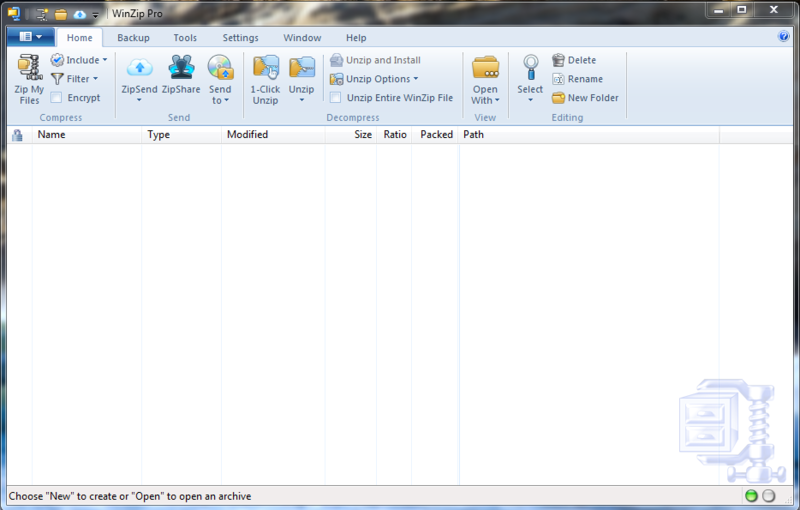
WinZip is the world's most popular file compression software with over 20 years experience as the leader in the industry. No other file compression utility offers such an innovative and easy-to-use feature set! Save time, conserve space, and share more with WinZip!
Features
- Compress Files
- WinZip 16 File Compression Software
- Encrypt Files
- Encrypt WinZip files with ease.
- Back Up Files
- Backup files to prevent data loss.
What's New?
Now it’s even quicker and easier to zip/unzip files for fast, efficient, and secure uploading/downloading, emailing, and storage! WinZip 16 delivers fundamental architectural improvements, a simplified design, and significant new file sharing functionality. Highlights include:
- Brand new performance architecture for high-speed zipping
- Streamlined menus and tools for an even better user experience
- Groundbreaking Desktop Gadget for instant access to key WinZip functions
- Innovative Zip and E-mail features that make file sharing effortless
- WinZip 16.0 introduces integration with ZipSend, our brand new file delivery web service!
- WinZip 16.0 introduces one-click access to ZipShare, our brand new Facebook service!
Decompress Files
In addition to compressing files, WinZip instantly opens and extracts content from the industry's widest selection of compressed file types:
- Zip (.zip)
- Zipx (.zipx)
- RAR (.rar)
- 7Z (.7z)
- BZ2 (.bz, .bz2, .tbz, .tbz2)
- LHA/LZH (.lha, .lzh)
- Cabinet (.cab)
- Disc Image (.img, .iso)
- TAR (.tar)
- GZIP (.gz, .taz, .tgz)
- Compress (.tz, .z)
- UUencode (.uu, .uue)
- XXencode (.xxe)
- MIME (.b64, .mim)
- BinHex (.bhx, .hqx)
- Most other compressed files
Screen Shots
 |
| Screen Shot 1 |
 |
| Screen Shot 3 |
 |
| Screen Shot 2 |
System Requirements
WinZip 17 integrates seamlessly with Microsoft Windows 8, Windows 7, Windows Vista, or Windows XP.
File Size: 29.16 MB
Platform: Windows
WinZip is the world's most popular file compression software with over 20 years experience as the leader in the industry. No other file compression utility offers such an innovative and easy-to-use feature set! Save time, conserve space, and share more with WinZip!
Why compress files?
Conserve storage space
Send swifter emails
Improve upload/download times
Compress multiple files into one
Decompress Files
In addition to compressing files, WinZip instantly opens and extracts content from the industry's widest selection of compressed file types:
- Zip (.zip)
- Zipx (.zipx)
- RAR (.rar)
- 7Z (.7z)
- BZ2 (.bz, .bz2, .tbz, .tbz2)
- LHA/LZH (.lha, .lzh)
- Cabinet (.cab)
- Disc Image (.img, .iso)
- TAR (.tar)
- GZIP (.gz, .taz, .tgz)
- Compress (.tz, .z)
- UUencode (.uu, .uue)
- XXencode (.xxe)
- MIME (.b64, .mim)
- BinHex (.bhx, .hqx)
- Most other compressed files
Screen Shots
 |
| Screen Shot 1 |
 |
| Screen Shot 3 |
 |
| Screen Shot 2 |
Encrypt Files
Encrypt and password-protect your files as you zip them, all in one easy step! WinZip provides strong AES encryption to help you secure sensitive data from unauthorized access. You can even define your own password policies that WinZip will enforce for each file that you encrypt.
Did you know? WinZip auto-wipes or "shreds" temporarily extracted copies of encrypted files using the U.S. Department of Defense standard (DoD 5220.22-M). This automatic action prevents protected files from being recovered and misused.
System Requirements
WinZip 17 integrates seamlessly with Microsoft Windows 8, Windows 7, Windows Vista, or Windows XP.
File Size: 99.19 MB
Platform: Windows
WinRAR is a powerful archive manager (Windows, Linux, Mac). This is a powerful compression tool with many integrated additional functions to help you organize your compressed archives. It can backup your data and reduce size of email attachments, decompress RAR, ZIP and other files downloaded from Internet and create new archives in RAR and ZIP file format. The archiver puts you ahead of the crowd when it comes to compression. By consistently creating smaller archives, WinRAR is often faster than the competition. This will save you disc space, transmission costs AND valuable working time as well. WinRAR is ideal for multimedia files. It automatically recognizes and selects the best compression method. The special compression algorithm compresses multimedia files, executables and object libraries particularly well. RAR files can usually compress content by 8 percent to 15 percent more than ZIP files can.
Features
- Using WinRAR puts you ahead of the crowd when it comes to compression by consistently making smaller archives than the competition, saving disk space and transmission costs.
- The program provides complete support for RAR and ZIP archives and is able to unpack CAB, ARJ, LZH, TAR, GZ, ACE, UUE, BZ2, JAR, ISO, 7Z, Z archives.
- WinRAR offers a graphic interactive interface utilizing mouse and menus as well as the command line interface.
- WinRAR is easier to use than many other archivers with the inclusion of a special “Wizard” mode which allows instant access to the basic archiving functions through a simple question and answer procedure. This avoids confusion in the early stages of use.
- WinRAR offers you the benefit of industry strength archive encryption using AES (Advanced Encryption Standard) with a key of 128 bits.
- WinRAR supports files and archives up to 8,589 billion gigabytes in size. The number of archived files is, for all practical purposes, unlimited.
- WinRAR offers the ability to create selfextracting and multivolume archives.
- Recovery record and recovery volumes allow to reconstruct even physically damaged archives.
- WinRAR features are constantly being developed to keep WinRAR ahead of the pack.
Screen Shots
 |
| Screen Shot 1 |
 |
| Screen Shot 3 |
 |
| Screen Shot 2 |
Installation Guide
1. After you install WinRAR 5 Beta 3
2. Copy the rarreg.key to your installation directory.
3. Enjoy!!!


.gif)